
Why Most HR Teams Struggle to Get Value From AI Tools
Artificial intelligence has become one of the most talked-about technologies in human resources, yet the results for many organizations have been underwhelming. According to recent research from Gartner, 88% of HR leaders say their organizations have not realized significant business value from AI tools. That is a striking number, and it points to a problem that goes beyond technology selection.
The real challenge is not finding an AI tool — it is using AI in a way that saves time without compromising the quality of your decisions. An HR analytics dashboard built with AI is one of the most practical places to start. When done correctly, it allows HR professionals to move faster from raw data to meaningful insights, without needing to write a single line of code.
This guide walks you through exactly how to do that — covering why AI helps, what you need to prepare, the four steps to build your dashboard, and how to interpret and share your results effectively.
Why Use AI To Build Your HR Analytics Dashboard
Traditionally, building an HR dashboard has required a combination of spreadsheet expertise, data visualization skills, and sometimes even basic programming knowledge. For many HR teams, this created a significant bottleneck. Analysts spent hours cleaning data, fixing broken formulas, and formatting charts before any real decision-making could begin.
AI tools change this dynamic in several important ways:
- Faster data cleaning: AI can identify inconsistencies, duplicates, and missing values in workforce datasets far more quickly than manual review. What once took hours can now take minutes.
- Automated first-draft visuals: Rather than building charts from scratch, AI can generate initial visualizations based on your data, giving you a starting point you can refine.
- Natural language interaction: Many modern AI tools allow you to describe what you want in plain English. You can ask for a turnover trend chart or a headcount breakdown by department without touching a formula.
- Reduced manual reporting effort: Once your dashboard is set up, AI can help automate recurring reports, freeing HR professionals to focus on analysis and action rather than data wrangling.
The result is a faster path from data collection to the insights that actually drive business decisions.
What You Need Before You Start Building an HR Dashboard With AI
AI is a powerful accelerator, but it cannot compensate for poor preparation. Before you open any tool, make sure you have the following in place.
Clean, Reliable Data
Your dashboard is only as good as the data behind it. This means your workforce data should be consistent, up to date, and free from significant gaps or errors. Common sources include your HRIS, payroll system, performance management platform, and engagement survey results. Spend time auditing your data before feeding it into any AI tool.
A Clear Business Question
The biggest mistake HR teams make when building dashboards is starting with data and hoping insights will emerge. Instead, start with a specific question. Are you trying to understand why turnover is increasing in a particular department? Do you want to track time-to-fill across different hiring managers? A clear question shapes which metrics matter and which do not.
Relevant KPIs
Once you have your business question, select the key performance indicators that will help answer it. Common HR KPIs include employee turnover rate, headcount by department, absenteeism rate, time-to-hire, offer acceptance rate, and training completion rates. Resist the temptation to include every metric available — focused dashboards are far more useful than cluttered ones.
Human Oversight Built In
AI can surface patterns and generate visuals, but human judgment remains essential. Plan from the start for how HR professionals and business leaders will review, question, and act on the insights your dashboard provides.
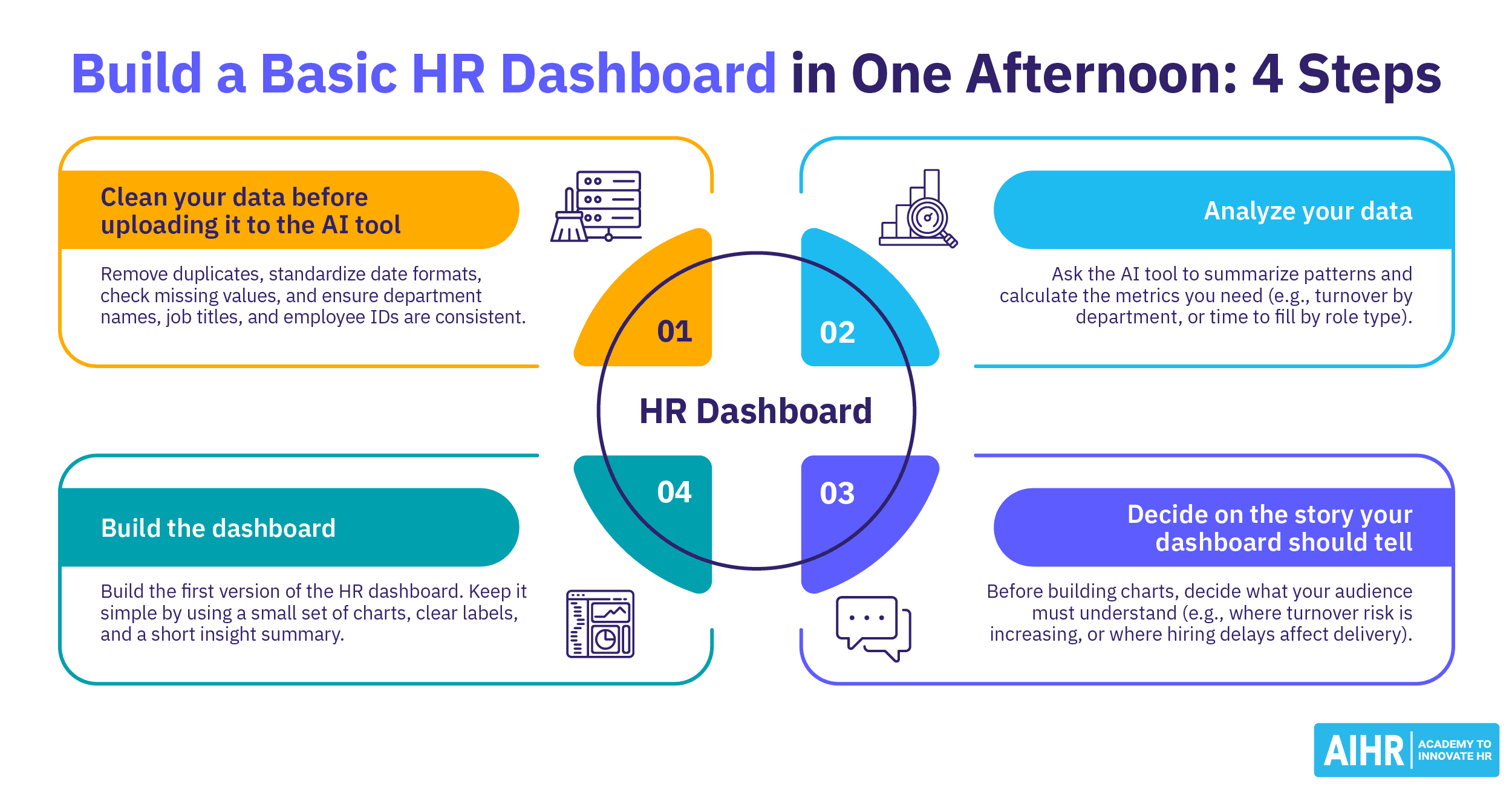
4 Steps To Build a Basic HR Analytics Dashboard With AI
Step 1: Gather and Prepare Your Data
Export the relevant datasets from your HR systems. Consolidate them into a single structured file — a spreadsheet works well for most use cases. Use your AI tool to scan for inconsistencies, flag missing values, and standardize formatting. The goal is a clean, unified dataset that accurately reflects your workforce.
Step 2: Define Your Dashboard Structure
Decide how many sections your dashboard will have and what each section will display. A basic HR analytics dashboard might include an overview section with headline metrics, a trend section showing changes over time, and a breakdown section segmenting data by department, role, or location. Sketch this out before you start building — it saves significant time later.
Step 3: Use AI To Generate Visuals and Calculations
With your structure defined, prompt your AI tool to create the visualizations and calculations for each section. Be specific in your instructions. For example, instead of asking for "a turnover chart," ask for "a monthly voluntary turnover rate trend for the past 12 months, shown as a line chart." The more precise your prompt, the more useful the output.
Step 4: Review, Refine, and Validate
Never publish an AI-generated dashboard without reviewing it carefully. Check that the numbers match your source data, that trend lines make logical sense, and that the visuals are easy to interpret. Ask a colleague unfamiliar with the data to look at the dashboard — if they cannot quickly understand what it is telling them, it needs further refinement.
How To Interpret and Share Your AI-Built HR Analytics Dashboard
Building the dashboard is only half the work. The other half is making sure the insights reach the right people and lead to action.
When interpreting your dashboard, always connect the data back to your original business question. Look for patterns, anomalies, and correlations rather than simply reporting numbers. For example, if your dashboard shows that turnover spiked in Q3 across one department, investigate what changed during that period rather than simply noting the increase.
When sharing your dashboard with business leaders, provide context alongside the visuals. A chart showing a 15% increase in absenteeism means very little without an explanation of what is driving it and what HR recommends in response. Position your dashboard as a conversation starter, not a final answer.
Finally, plan for regular updates. An HR analytics dashboard that reflects data from six months ago quickly loses its value. Build a cadence for refreshing your data and reviewing whether your chosen KPIs are still answering the right questions.
The Bottom Line
Building an HR analytics dashboard with AI is one of the most accessible ways for HR teams to strengthen their data capabilities without needing technical expertise. The tools are increasingly capable, and the barriers to entry are lower than ever. But technology alone is not enough. Clean data, a clear business question, the right KPIs, and consistent human oversight are what separate dashboards that sit unused from ones that genuinely inform better workforce decisions. Start simple, stay focused, and let the insights guide where you go next.